Vending Basics for New Operators
Planograms: what they are and how to build one.
A planogram says which product goes in each coil, at what price, and how full to fill it. Here is why every machine needs one and how to put one together.
A planogram is the map of one machine.
It lists every selection in the machine, from A1 down to the last coil, and for each one records what goes there and how it should be filled. Whoever restocks the machine works from it, and your sales records read through it.
Selection
The code a customer keys in, such as A1 or C4, matched to one coil or column.
Product
The item that goes in that coil, sized to drop cleanly from it.
Price
What the selection charges. On a card sale, the reader is asked for exactly this amount.
Capacity
How many of that product the coil holds when it is full.
Par level
How many you fill it to on a visit. A slow seller can sit below capacity.
Why every machine needs one.
Restocking goes faster
Anyone filling the machine knows what goes where, without guessing from what is left.
Prices stay right
The price on the machine matches the price you meant to charge.
Sales are counted by product
A sale on B2 becomes a sale of the product in B2, so you see what sells, not only which coil turned.
You pack the right stock
The planogram tells you what to bring to each machine before you leave.
How to build one, step by step.
Start from the machine’s layout
Count the trays and the coils on each, and note which take wide items, bottles, or small packs.
Fit products to coils
Match each product to a coil it fits, so it drops every time without jamming.
Place your best sellers well
Put them where customers look first, and give a strong seller two coils so it sells out less often.
Set prices and pars
Price every selection and set how full to fill each coil.
Review after a few weeks
Swap slow sellers for something new, and move pars toward what actually sells.
Planograms in Dryline.
Scan a product’s barcode to fill a coil, save a layout as a template for machines that match, and review every change in plain English with a way to roll back to an earlier version.
DrylineVMS AI Planogram Assist asks five short questions, then drafts a plan for the machine from your own products and sales. Nothing reaches a machine until you publish it.
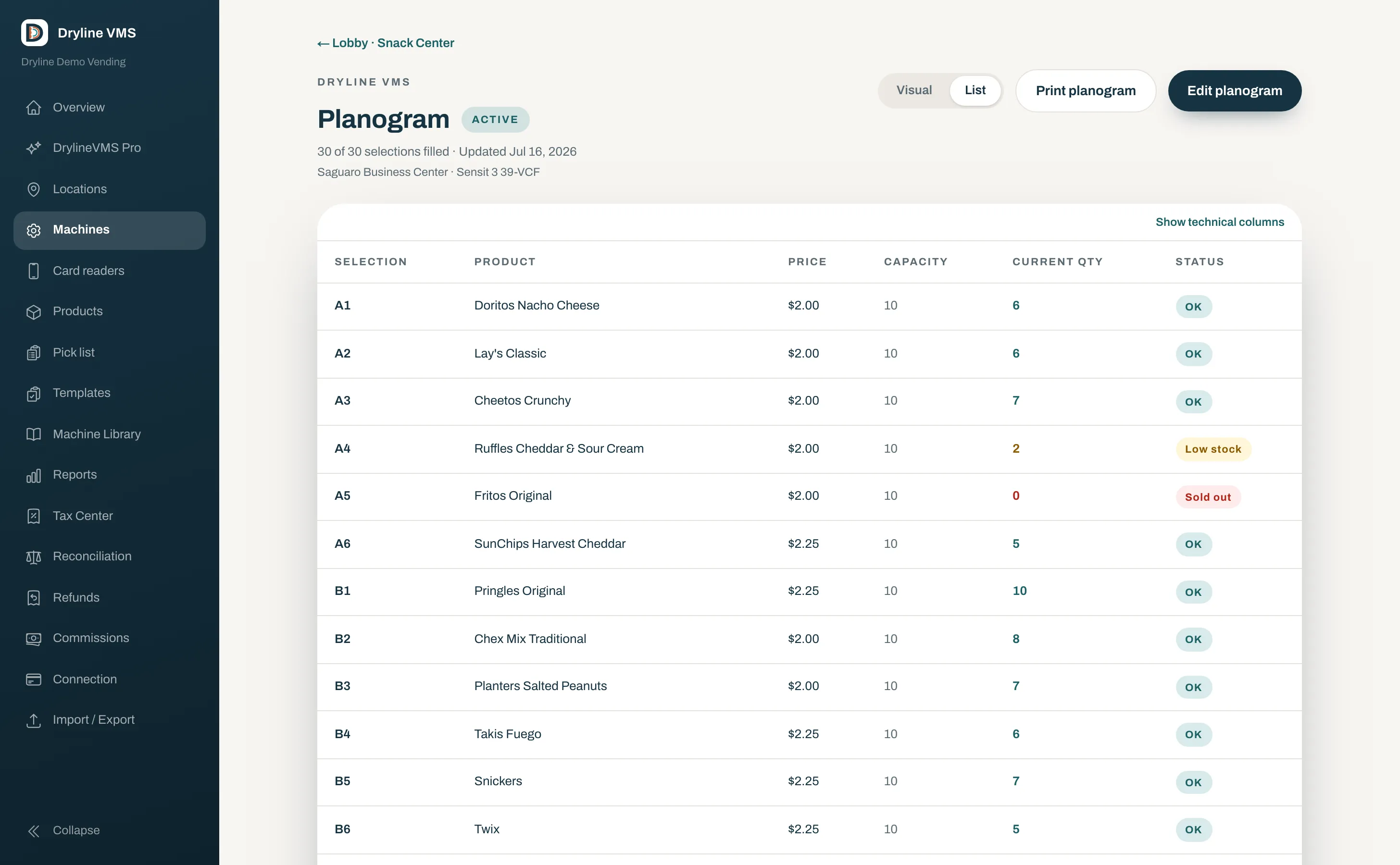
See every selection on the machine’s real front.
Each selection shows its product, price, capacity, and what is in it now, with low and empty coils flagged.
Questions about planograms
- How often should I change a planogram?
- Look at it again a few weeks after a machine goes in, then whenever its sales shift. A new season and a new location are both good reasons to review it.
- Do I need a different planogram for every machine?
- Not always. Machines of the same model at similar locations can start from one layout, saved as a template, and then follow what sells at each location.
- What is the difference between capacity and par?
- Capacity is how many a coil holds when it is full. Par is how many you fill it to on a visit, which can be lower for a product that sells slowly.
More vending basics.
Why offer cashless
What card and phone payments add for customers and for you, and what a machine needs to take them.
Tap to Start, Select First, and Multivend
Pay first, choose first, or buy several items with one tap, and why your machine has a say.
How MDB works
How the controller runs the coin mechanism, bill validator, and card reader on one connection.
Stocking strategies
A first product mix, par levels, rotation, and restocking the machines that need it.
Starting a vending business
Licenses, sales tax, insurance, machines, locations, commissions, pricing, and routes.
Build your first planogram in Dryline.
Book a 20-minute demo and set up a machine with us on real screens.