AI-native vending management solutions
AI innovation for the vending machines you already run.
Dryline is bringing AI to traditional vending. DrylineVMS AI Planogram Assist drafts a plan for a machine from your own products and sales, shows the reason for every pick, and leaves every decision with you.
Bringing AI innovation to traditional vending machines
No new machines. Three steps to AI.
The machine in the lobby does not change. What changes is what you know about it, and what the software can do with that.
Connect the machine
The Rain Pay reader plugs into the machine’s MDB port and takes tap, chip, and swipe. Every card sale arrives tied to its slot.
Dryline keeps the record
Products, prices, costs, stock per slot, and every sale, for each machine and across the fleet.
AI drafts the plan
AI Planogram Assist works from that record and proposes which product belongs in which slot. You review it and publish it yourself.
AI Planogram Assist
Five questions. One AI-drafted planogram.
A planogram is usually set once and left alone, because rebuilding one takes an evening. This takes a few minutes, and you see why each product was picked.
Answer five short questions
The machine, the products to choose from, the kind of place, what it should sell, and the goal: profit, turns, a healthy range, quick snacks, or a balance.
Review the AI’s plan
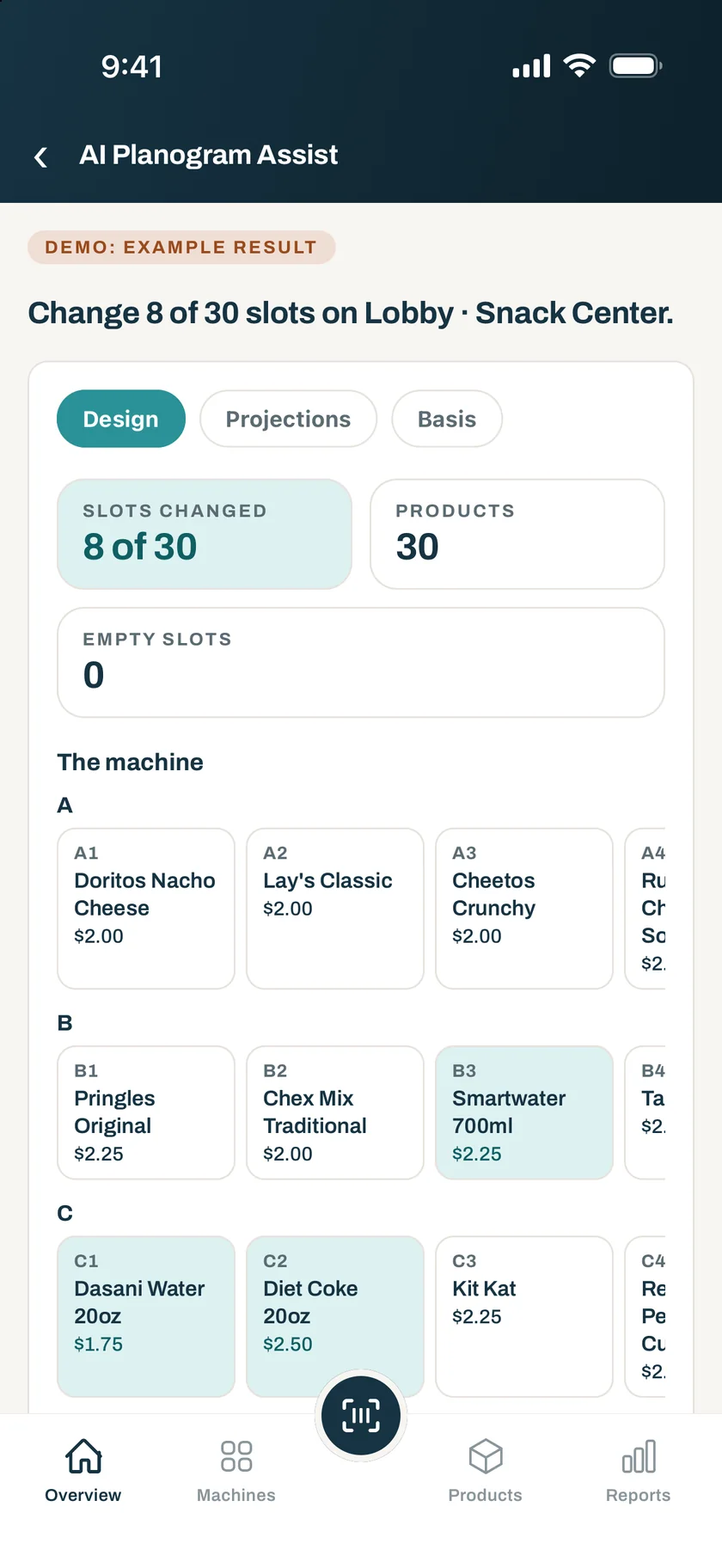
The machine drawn slot by slot with every change marked, the projections, and the reason for each slot. Then say what you want different.
Save it as a draft
The draft goes through the same publish review as any planogram. Nothing reaches a machine until you publish it.
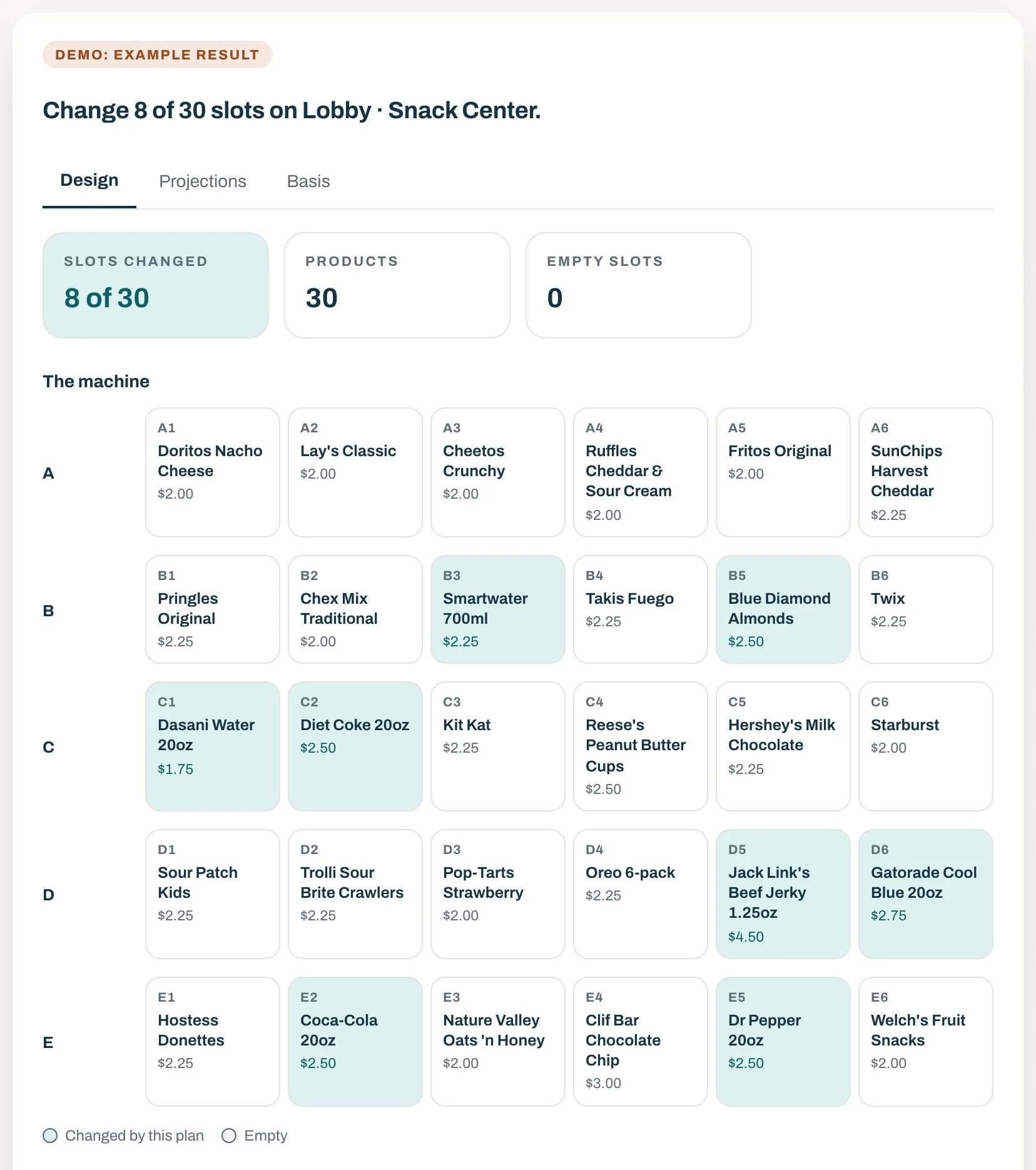
The plan, drawn on the machine
Every slot shows the product the AI proposes, with the slots it would change marked. The figures on top say how much of the machine the plan touches.
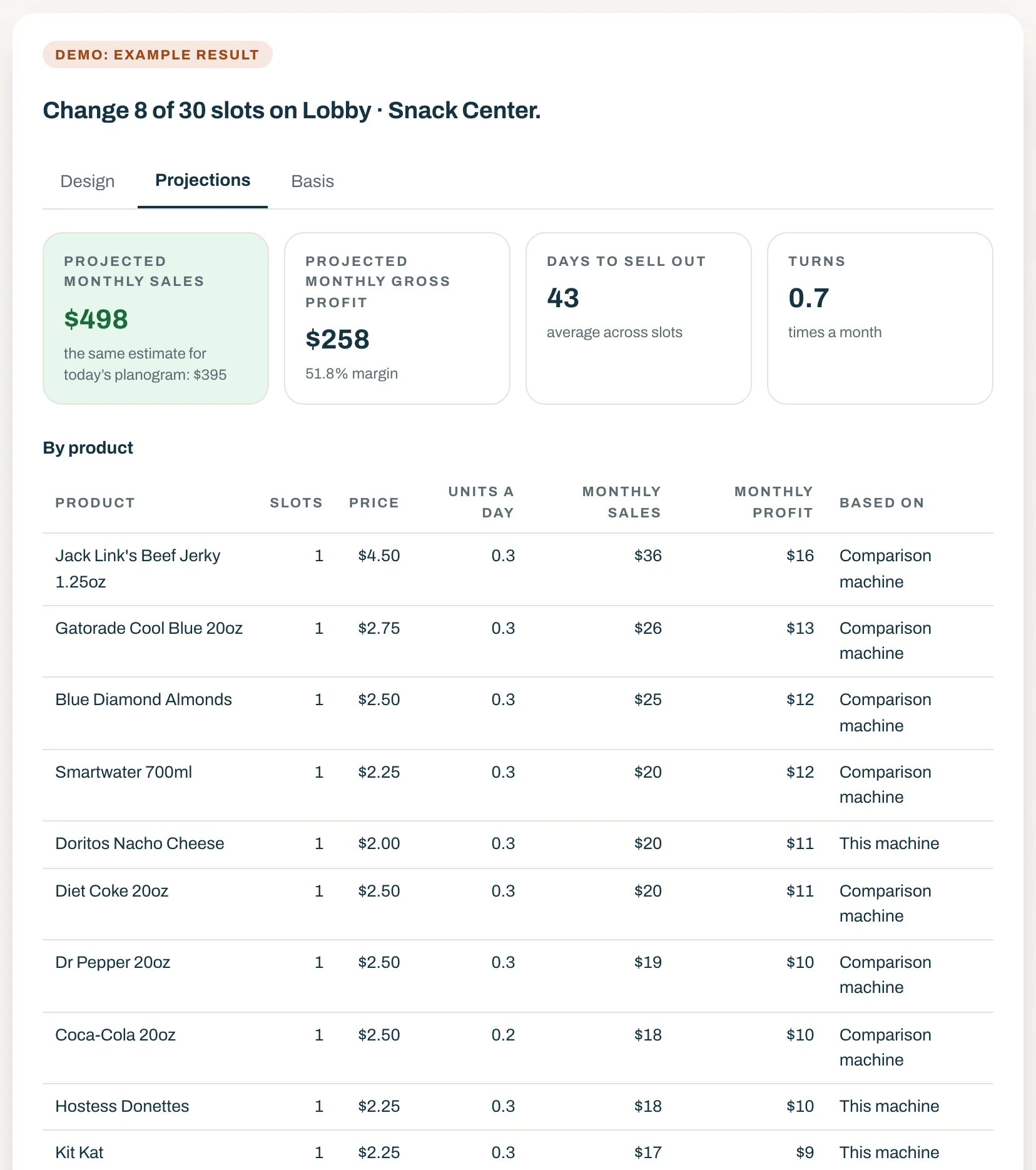
Projections from your own sales
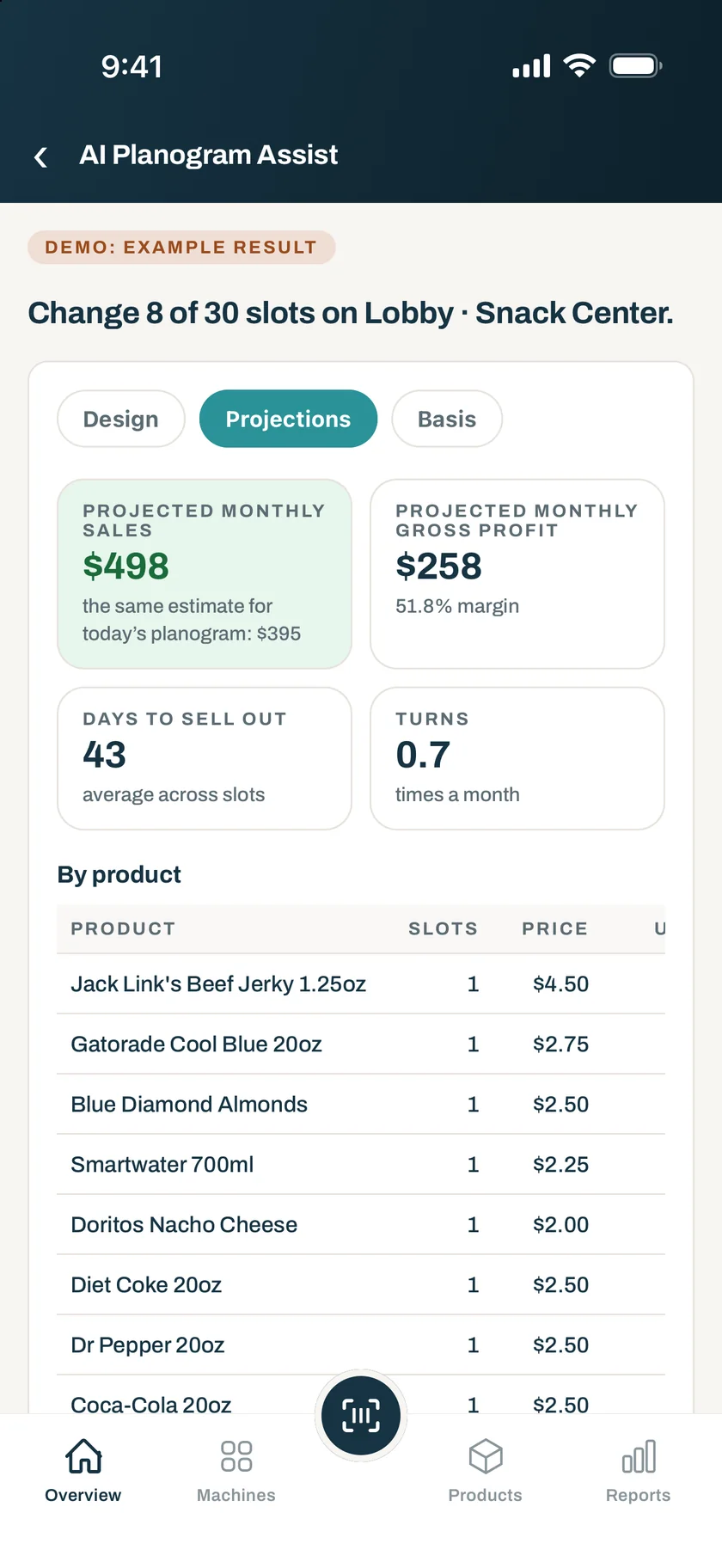
Sales, gross profit, margin, days to sell out, and turns, next to the same estimate for today’s planogram. Dryline works them out from your sales history. They are estimates, not promises.
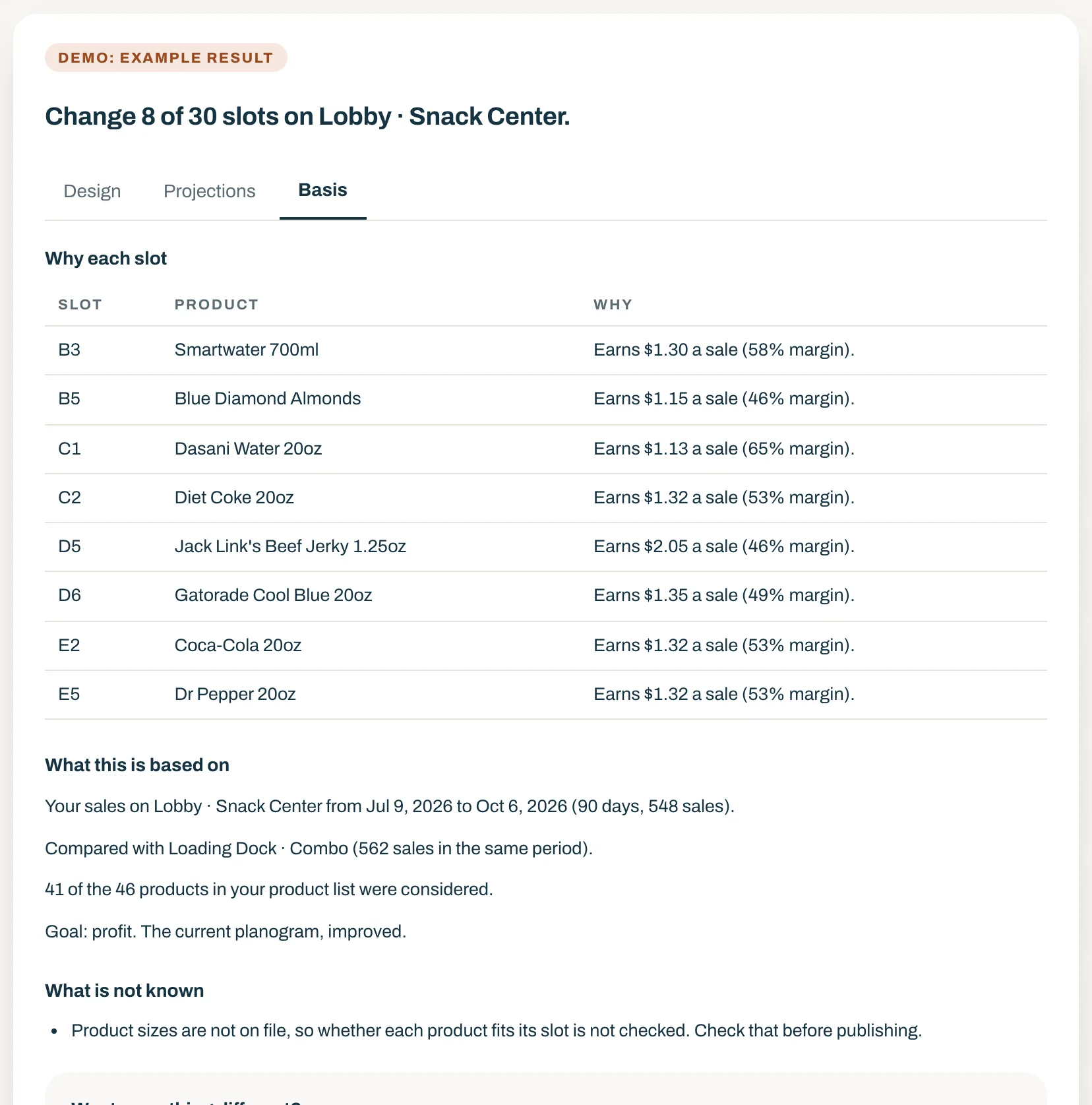
Every AI pick, explained
Each changed slot comes with its reason and the figure behind it, the sales period it came from, and what is not known.
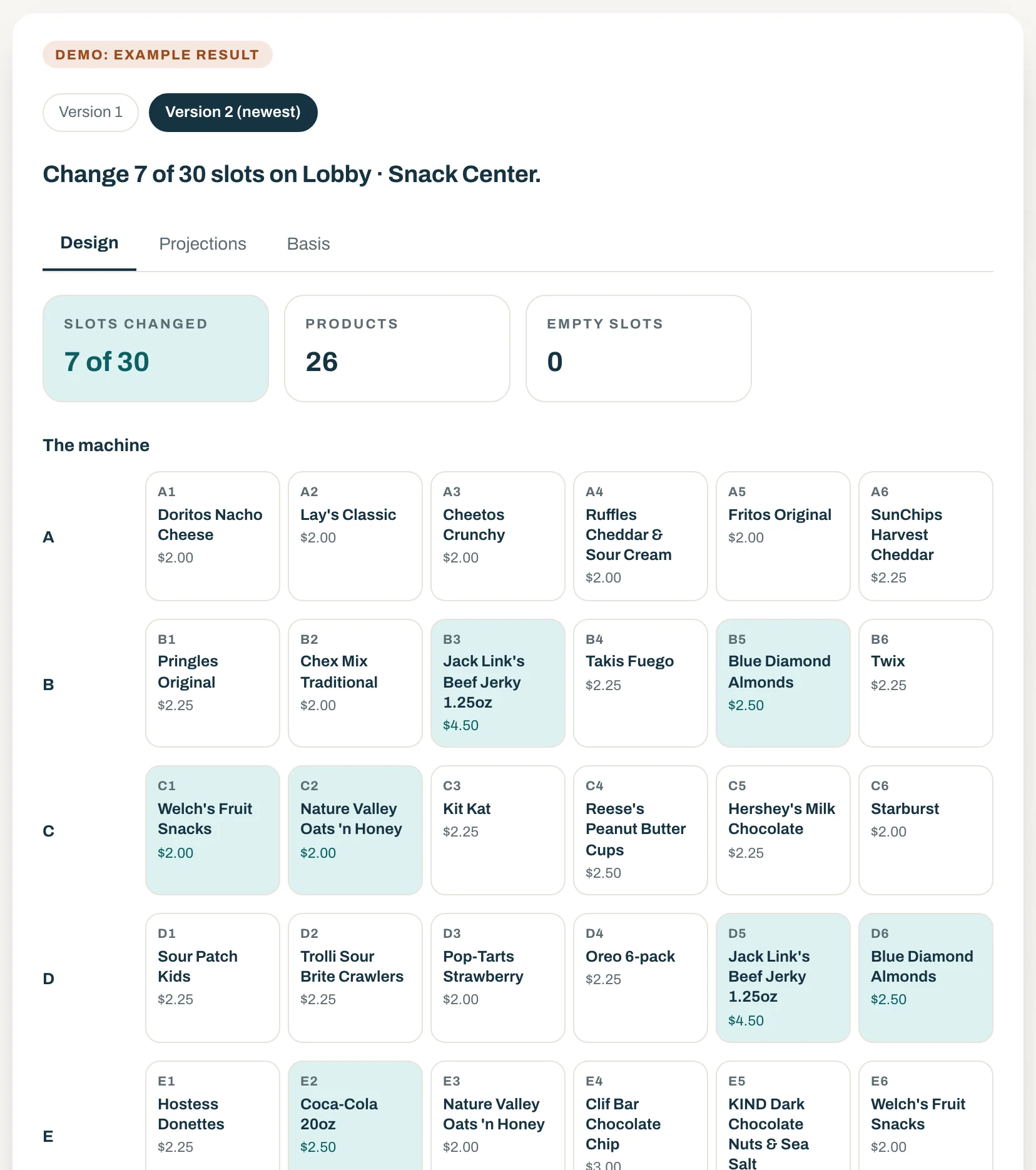
Changes in your own words
Ask for more healthy options or fewer candy slots and the plan is drafted again. The earlier version stays, so you can compare.
On the web and in the app
At the machine, on your phone.
The same five questions and the same plan, in the Dryline VMS app for iPhone and Android, in English and Spanish. Share the plan as a PDF with the location, or save the draft and publish it later.
Included in DrylineVMS Pro, for owners and admins. To see it on sample machines first, tap Try the demo in the Dryline VMS app and open AI Planogram Assist.
You stay in charge
AI does one job. You make every decision.
The AI chooses which product goes in which slot. Everything else on the plan, and everything that happens to a machine, is yours.
It never publishes
A plan is saved as a draft. It reaches a machine only after you review it and publish it yourself.
It never sets a price or orders stock
The AI picks products for slots. Prices, costs, and orders stay yours.
It never invents a number
Every price, projection, and reason on the plan is worked out by Dryline from your own data.
It sees only what it needs
What is sent to the AI provider is your product, slot, and sales figures. Never customer or payment data.
Common questions
Dryline’s AI, answered
- Does Dryline use AI?
- One feature does. DrylineVMS AI Planogram Assist, part of DrylineVMS Pro, uses AI for a single job: choosing which product goes in which slot. Every price, projection, and reason on the plan is worked out by Dryline from your own data, and nothing is published until you review the draft and publish it yourself. What is sent to the AI provider is your product, slot, and sales figures, never customer or payment data.
- What does the AI decide?
- Which product goes in which slot, and nothing else. It does not set prices, publish a planogram, or order stock. Dryline works out every price, projection, and reason on the plan from your own data.
- Is a projection a promise?
- No. A projection is an estimate from your past sales, shown next to the same estimate for today’s planogram. A product with no sales history is shown without one.
- Do I need new machines?
- No. Dryline works with the machines you run today, provided they support MDB cashless, which most modern machines do. The Rain Pay reader connects over the MDB bus alongside the coin and bill acceptors already there.
- Who can use it, and where?
- Owners and admins, on the web console and in the Dryline VMS app for iPhone and Android, in English and Spanish. Adding a supplier’s file is done on the web.
- How do I see it?
- Included in DrylineVMS Pro, for owners and admins. To see it on sample machines first, tap Try the demo in the Dryline VMS app and open AI Planogram Assist.
See AI plan a machine, on real screens
Book a 20-minute demo and we will walk through AI Planogram Assist on real screens, with the questions an operator would ask.